Ads 468x60px

Showing posts with label 3D. Show all posts

Tuesday, July 22, 2014

New Silhouette Promotion and a Silhouette Studio Tutorial!

It's that time again!  
Today we are introducing a new Sihouette Promotion!
This month's promotion features...
 a CAMEO bundle which includes:
1 Silhouette CAMEO
1 copy of Silhouette Studio Designer Edition
1 teal CAMEO dust cover
for
$269.99

and 

a Portrait bundle which includes:
1 Silhouette Portrait
1 copy of Silhouette Studio Designer Edition
1 grey Portrait dust cover
for
$149.99

as well as 

40%* off Silhouette Studio 
Designer Edition Software!

To get these deals, simply click HERE and enter promo code SAMANTHA!

Creative Team Member Allie created this fabulous 
First Aid Box and is providing a detailed Silhouette Studio tutorial too! 


Hey there, it's Allie from My Card Party and I have 
fun tutorial that will help you customize your projects!


I'm using shapes #62208 (Circle Basket with Small Bow) to create a little first aid basket for my medicine cabinet. I have a full sized first aid kit in the kitchen, but I hate dragging it out for a simple cut. I thought I'd just make a tiny basket to hold the ouchie essentials.

Let's get started. I'll walk you through all the steps using some of the Designer Edition tools. With these great features, you can really style your projects to suit your needs.

You'll need some red cardstock - a scrap will do, and white cardstock - I used a sheet of 8.5x11". 


I'm using the basket with a bow, but I will not be needing the bow. 
I also don't need the basket to be very big, so I've reduced everything to 75%.


To add a cross, start by drawing a rectangle. Align it with the middle of the basket by selecting the basket and the rectangle and using the ALIGN feature.


Copy the rectangle and rotate it by 90 degrees. ALIGN.


Group the two rectangles and WELD.


To get it aligned I added a rectangle for reference and then made sure it was centered nicely.
Delete the rectangle when you are done aligning.


OFFSET the cross and create an outline.


Change lines to dotted to create a stitched effect.


Make an extra copy of the stitched cross. 
Note: Change the lines back to regular cutting lines.
I've changed it to red so you can see it, this will be cut from red cardstock.


Using the OFFSET tool, make an INSET LAYER of the strap. 
I've colored it red just so you can see it. This will also be cut from red cardstock.


Ungroup the outer strap and the holes.


Pull away the outer strap and delete. Now you have a smaller strap with holes, to match the first one you cut out.


Assemble basket. The red cross will go inside. You only need to put a little bit of adhesive in between the stitched shape and the opening.

This little project is super affordable and easy. Now it's your turn, go on and customize one of these fun baskets for any occasion!


I filled it with two sizes of bandages, some antibiotic ointment and some lifesavers.
Something sweet makes an ouchie all better!


Here's my basket in action, at home in our medicine cabinet.

Thanks for joining me today.

Remember, these deals end July 31st!
Click HERE and enter promo code SAMANTHA!

Tuesday, November 05, 2013

Hexi Boxes from Lindsay Smith!
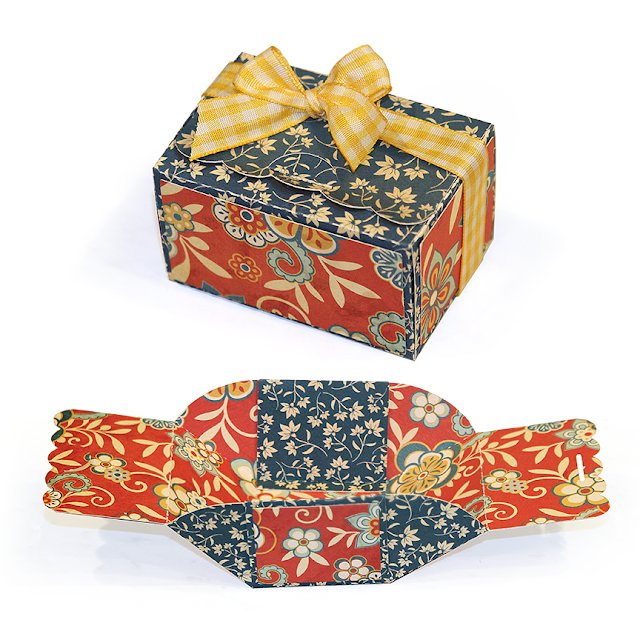

 Good Morning!  Today we are sharing fan photos from Lindsay Smith!  
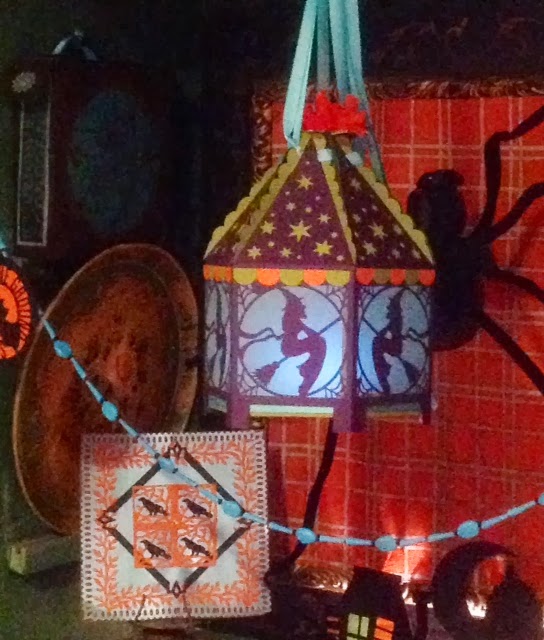
Lindsay wrote to us sharing her versions of the Hexi-Box Witch and 
the Hexi-Box Dancing Skeleton Silhouette Boxes! 
Just have a look… 


She used vellum so that she could use the boxes as lanterns and she used long ribbons so that they could be hung!  Lindsay also shared a fun tip with us…she found that by inverting the hex base that it can slide in and out which makes the box collapsible for easier storage!


You can find these files by clicking on the images below:


A special thanks to Lindsay for sharing her creativity and inspiring all of us!

* * * * * * * 

Thursday, September 19, 2013

Introducing Guest Designer Kerri Smith!


Good Morning!  
Today we would like to introduce you to our 
September Guest Designer, Kerri Smith!

* * * * * 
Hey Crafty Friends-

I am THRILLED to be guest designer this month for Samantha Walker. Let me introduce myself to all the new friends that may be visiting the blog today. My name is Kerri Smith. My little blog is Craft Time and Cupcakes. I am wife to my retired Air Force husband and mommy to two beautiful princesses, ages 4 and 5. I am a Southern California girl living the Vegas life and I love it! I have always been a creative person. I love every type of craft imaginable. I am a scrapbooker, baker, party planner, and I'm beginning to work more with fabric too. I would say my crafting style is a little bit country, a little bit cutesy, and a lot of fun. I believe projects should be quick, simple, and stunning.  I was so happy working on my project for today.......so let's get to it!

 I'm sure that many of you with a Silhouette love to shop Samantha's cutting files as much as I do. For today's project I decided to do something that sticks with the theme of my blog.......A cupcake box! 

I used the Cupcake Scalloped Box cutting file. I cut the pieces from craft cardstock and a blue and red floral cardstock.


I folded all of the perforated lines then glued the tab of the craft cardstock piece to the floral cardstock to merge the top and bottom of the box together. I then glued all the remaining tabs to complete the box.


Once it was all together I jazzed things up a bit by inking up the edges using Tim Holtz Distress Ink in Festive Berries.


I then placed the circle insert inside the box and added my yummy cupcake.


The final touch to my project was a red gingham ribbon tied around the box to hold it all together.


I couldn't be happier with how this project turned out. The file was so easy to cut and put together. I can see making these boxes for every holiday, teachers gifts, birthday parties. They will put a smile on any one's face when they receive this special little gift.

I want to say a special thank you to Samantha Walker Designs for letting me guest design this month. For more inspiration please follow my blog at http://www.crafttimeandcupcakes.com/. You can also follow me on Pinterest and Facebook.

Have a great crafty day!

Kerri


Tuesday, August 27, 2013

Advice for the Graduate by Jamie Cripps

Good Morning!  Jamie back with you and today sharing an entry way piece I created using Samantha's Key Silhouette Cut and Lace Top Tag Silhouette cut for a Graduation party!


This will sit beside a large metal tree so guests can write their "keys to success" or their special wishes for the graduate on the tags and then hang them on the tree!

I started by cutting 9" lengths of the Light Blue Double-Faced Satin Ribbon and then tying them in bows.  I trimmed each of the ends at a slant.
I cut the tags and keys with my digital die cutting machine.

To create each tag:
1. Place a 5" piece of twine through the top of the tag.
2. Place your satin bow in the middle of the twine and tie the twine around the bow.
3.  Place the key through one end of the twine.
4.  Tie a knot in the top of the twine to hang.

I cut out Lori Whitlock's Flower Pot with Tray to hold all the tags.

Supplies:
Die Cuts: KeysTagsHolder (Silhouette)
Ribbon: Light Blue Double-Faced Satin Ribbon - (Ribbons Unlimited)
Cardstock: Neenah Natural Linen, Basic White, Basis Navy (CutCardstock.com)
Sticker: Graduation (SRM)

This project could be adapted for an anniversary party, bridal shower, 
or even advice for new parents!

Thanks so much for stopping by today!

Here are some supplies that you can use to make today's project, and other fun stuff.
 

Sunday, July 28, 2013

Quick and Easy Paper Wine Tote Tutorial with Linda


Hi everyone! Linda here from Paper Boutique with Linda. I love Samantha Walker’s Cool Summer Collection and just had to use it to design an adorable wine tote. You do not need a cutting machine to make this quick and easy project.


This tote will hold all sizes of wine bottles, but I also designed it to hold a bottle of sparkling cider. Soda or juice cans also fit. You could also use this as a gift tote and add a pair of cute sunglasses, a bottle of sparking water and sunscreen. It is so versatile.


Samantha Walker’s papers work perfectly for this project. Isn’t the tag adorable? I used her
Cool Summer collection in the video and it is mega adorable!


Have a great week and thanks for visiting!

Linda

* * * * * * * 
Craftsy

Monday, July 15, 2013

Silhouette tutorial "Expandable box" for Portrait and Cameo users

Here's a fun box that is the perfect size for little gifts. This makes a great presentation for any occasion.

I have two versions of the expandable box, each with a few different styles. One is a square box and is formatted for Cameo users--though Portrait owners can size it down and get a slightly smaller version of the box. The second version of the box is rectangular and is formatted with Silhouette Portrait users in mind--though it can be sized up and be used by Cameo owners. The instructions here apply to all of the expanding boxes. Look for new styles on this expanding box in my Silhouette store.

Just click on the images below to be taken to the cut file:


 Cut the file out. I recommend double sided cardstock with contrasting colors. 
 Fold all dotted lines toward the center except for the long 1/4 inch tabs which will fold outward.
 Glue on the contrasting sides (this is optional of course.)
 Fold the box so that the curved tabs fold under the sides. 
Glue the 1/4 inch tab down in the the box to hold.
 Note that the box will now act as if it is hinged and can expand, and contract. (cool, huh!)
Now close the box using by inserting  half moon tab into the slot. 
Optional: Tie a ribbon around the box for decoration.

Happy Crafting!
Samantha


Get Amazon Prime Membership! Enjoy Free 2-day Shipping on Prime products, plus access to Free digital content like videos, books, and more!
Related Posts Plugin for WordPress, Blogger...