Ads 468x60px

Showing posts with label Silhouette machine. Show all posts

Thursday, December 05, 2013

Silhouette: How'd you do that? Putz-Style Glitter Houses

Thanks for popping in today!
If you've been reading the blog this week, you've already learned how to assemble a few of these glitter houses using your Silhouette cutting machine with my house files from the Silhouette store:

Today, I have a cute little red one to show you. 
Here are the steps I took to finish my house:
1. Ungroup your file. Select your house piece and put in the live cutting area.
2. Cut the house piece in your desired color, I chose red for this house.
3. Cut the windows, roof in another color.
4. Cut the base in white (or green for a spring variation.)

I assembled it using American Crafts glitter card stock. It is as thick as thin chipboard and requires setting your silhouette machine blade depth to 9 or 10. It also requires use of a fairly new blade. Some glitter papers aren't quite as thick. You may find one that you like better. Just know that not all glitter paper needs the blade to be set that deep. Also be sure your mat is still sticky and that your paper is secured.

You can also use a thick non-glitter cardstock and add glitter to your house with glue. I recommend putting the glitter on the house before it is assembled.

5. Gather your cut pieces, and glue the window frames around each window, and glue the door onto the front. You can use a hot glue gun, or a paper glue that works with glitter.
6. Crease all the fold lines.
7. Put glue on the tabs, and glue to the side walls of the house. You will be able to hold the tabs to the sides through the rectangle on the bottom of the house.
8. Glue the side wall tab, and close the house sides.

Notice how my house has the unsightly barcode showing from the back of the card stock? I included a wall backing piece just in case you run into this and want to cover it up. You could also put patterned paper here and "wallpaper" the interior of your house if you desire. This piece is not necessary for everyone, so some will find that it ends up being an extra piece.
9. Glue the optional wall backing piece to the back wall with a glue stick or other smooth paper glue.
 10. Glue the roof on starting at the center, then do one side, then the other. I used a hot glue gun so I wouldn't have to wait for drying. If you have a very thick card stock the glue gun works great. This is not a great option for thinner card stock as your glue lines will end up chunky. Just say "no" to chunky.
11. Notice that there is a little overhang on the roof. Make sure you center this.
 12. Now glue each side of the roof into place.
 13. Glue the house to the base…make sure to leave more room in the "front yard" and only about 1/2 inch in the "backyard".
14. Add one or two bottle brush trees to the front yard.
15. Add a wreath to the door if desired. I have both versions below:
Happy Crafting!


Wednesday, December 04, 2013

Silhouette Tutorial: How to make the Castle Glitter House from my Putz-Style House Series

Yesterday I showed you how to make the little pink glitter house with your cutting machine. Today, I'll show you how to make a castle style glitter house. The technique is about the same, though the shape is different. I hope to offer you a whole village by the end of the week. ;) 

This design will be available as a .studio or SVG file format in the Silhouette Online store


1. Ungroup your file. Select your house piece and put in the live cutting area.
2.  Cut the main castle piece in your desired color, I chose a happy yellow.
3. Cut the windows, roof, and chimney in another color. I chose white.
4. Cut the base in white.

I used glitter cardstock (it's like a light chipboard) by American Crafts. It is very thick. If you use this medium, use a newish blade, set the depth to 9 or 10 and select double cut. You will need to adjust your machine according to your material.

You can also use a thick non-glitter cardstock and add glitter to your house with glue. If you do this, I recommend putting the glitter on the house before it is assembled.

5. Gather your cut pieces, and glue the window frames around each window, and glue the door onto the front. You can use a hot glue gun, or a paper glue that works with glitter.
6. Glue the bows to the wreaths, then attach the wreaths to the house.
7. Fold the house piece as shown above. 
8. Glue the side wall tab, and close the house sides.
9. Put glue on the bottom tabs, and glue to the side walls to the bottom of the house. You will be able to hold the tabs to the sides through the rectangle on the bottom of the house, or use wonder clips until it is dry.
10. Fold the roof piece with the glitter side up and the tabs folding upward. 
11. Put glue on the back side of the roof tabs, and carefully insert into the house top, move it around until the tabs run parallel just underneath the castle top edge.
12. Hold the tabs of the roof against the inside of the house until glue is set, or use clips.
13. You may also apply extra glitter to the interior of the castle top as I did with my castle below. To do this, just put glue on the back side of the "castle" roof edge, and dip into glitter.
14. Glue the house to the base with a hot glue gun, so that the majority of the base is in front of the house and only 1/2 of an inch remains at the back of the house. 
15. Glue a couple bottle brush trees to the base with hot glue. 


Monday, December 02, 2013

How to Make Putz-Style Glitter House Ornaments with your Silhouette!


I had a little Putz house given to me by my Sunday school teacher when I was little. It was bright pink and had a white snowy roof and one little bottle brush evergreen tree. I loved that house, and put it on our Christmas tree with pride each year. It had a little hole on the back side where you could insert a Christmas tree light. Unfortunately, over time, I punched through the front paper windows with the tree light from the back side. I think eventually, it went where all broken ornaments go, and I haven't seen it since.

Even though that ornament is long gone, it's left a lasting impression on me. So much so, I thought I would do a series of Putz-style Glitter Houses for my Christmas tree this year.

This little pink house is the first in the series. You can view the tutorial for the next house in the series here.

Get this download:
From Silhouette in .studio or SVG format
http://www.silhouettedesignstore.com/?page=view-shape&id=52425


This house can be cut with most major cutting machines like the Silhouette Cameo and the Portrait cutting machines. You will need to adjust the size if you are cutting with the Portrait.

This is how you put it together:

1. Ungroup your file. Select your house piece and put in the live cutting area.
2.  Cut the house piece in your desired color.
3. Cut the windows, roof, and chimney in another color.
4. Cut the base in white.

I used glitter cardstock (it's like a light chipboard) by American Crafts. It is very thick. If you use this medium, use a newish blade, set the depth to 9 and select double cut. 

You can also use a thick non-glitter cardstock and add glitter to your house with glue. I recommend putting the glitter on the house before it is assembled.

5. Gather your cut pieces, and glue the window frames around each window, and glue the door onto the front. You can use a hot glue gun, or a paper glue that works with glitter.
6. Put glue on the base tabs, and glue to the side walls of the house. You will be able to hold the tabs to the sides through the rectangle on the bottom of the house.
7. Glue the side wall tab, and close the house sides.
8. Now we will move onto the roof piece. You can add the effect of snow with extra white glitter. Just put glue on the peak and at the ends of the roof, then dip in glitter. Notice how the glue adds a fun texture like layers of snow.
9. Crease the sides of the chimney. 
10. Join the sides of the chimney by glueing the side tab.
11. Fold the icicles down, and glue to the top of the chimney.
12. Fold the bottom tabs out, these will tuck into the hole on the roof. 
***Important!***
I changed the way the chimney joins the roof after doing this project. Instead of the tabs glueing to the top of the lid, they will tuck under a square hole where the chimney will go, and be glued to the back of the roof. With this in mind, I recommend attaching the chimney BEFORE attaching the roof to the house. 
 13. Glue the house to the base. Make sure that there is about 1/2 inch of base in back of the house, and the majority of the base in front of the house. Press down on the tabs from the inside of the house. You can use a glue gun or a good strong paper glue.
 14. Fold the icicle strips and attach them to the roof.
 15. Fold the roof and attach to the house. Please go back to step 12 if you are doing this step without the chimney attached. You will want to do this first.
 16. Hold the roof in place until set. (That's why a glue gun might be better here.)
17. I changed the chimney and how it attaches to the roof. This picture shows the chimney glued directly to the roof. Instead, I modified the file by adding a rectangular hole in the roof. The tabs on the chimney will insert into the roof and attach on the back side of the roof. Do this before attaching the roof to the house.
18. For an extra special touch, add a bottle-brush tree to the front with a glue gun.

You can also add clear or colored cellophane to the windows for a different look.

I hope you enjoy this first house in the series of Putz-Style glitter houses. Feel free to share your variation of this design with us via Facebook or Pinterest.

Monday, November 28, 2011

New this week! 11/28/11


"Bag Winter Lace" digital cutting file (available only at the Silhouette store online.)

"Christmas Tree Snowflake" digital cutting file (available only at the Silhouette store online.)

This week alone, I will have 34 new digital die designs releasing in the Silhouette store online. The collection features both intricate and simple snowflakes...as well as themed snowflakes.  There are also several lace top tag sets, a few cards, some decorative pennant flags to help you decorate your home for holiday parties...and a lacy gift bag (this one made me smile to create as I thought of how many ways I could use this over the holidays...just imagine it with some bright colored tissue behind the lace cute out...squeal!)


"Card Doily Lace" digital cutting file (available only at the Silhouette store online.)

(The Silhouette store can only be accessed by those using a direct link from the Silhouette Studio software, which is provided with any Silhouette machine.) The easiest way to find these new designs, is to go to the "browse artists" tab in the blue bar at the top of the screen on the Silhouette store homepage, then click on the Samantha Walker logo to browse my portfolio.  These will be showing up in the store as they are loaded from the artists queue.   
"lace top tag" digital cutting file (available only at the Silhouette store online.)

"lace pennant" digital cutting file (available only at the Silhouette store online.)

"Snowflake Card" digital cutting file (available only at the Silhouette store online.)

"Snowman Snowflake" digital cutting file (available only at the Silhouette store online.)

These are just a sampling of what you might find in my Silhouette store this week. There's a chance that some of these will start showing up in the store before the 50 cent sale ends, that is going on this week.

Friday, July 15, 2011

Silhouette Gardenia File

Just popping in with some instructions on the Silhouette Gardenia file.  It is one of my favorite files as it was designed in such a way that you can create dimension but in a relatively flat space. I have been asked a couple of times by e-mail how to assemble this flower, so I thought that there might be others out there who also have a question mark on their forehead when they come to this file.  I've laid out 1+2+3 instructions:

I also want to post a project from a wonderful crafter who used this file in a project, Dolly (she asked me not to use her last name.) She created these seed packets with the gardenia file and to add dimension, she inked the edges of her paper and curled the petals of the flower under.  I love how these turned out!

I love to share projects that you have made with the Silhouette machine.  If you have something that you made with my Silhouette files that you would like me to consider sharing on my blog, please feel free to contact me.

Thursday, June 23, 2011

Creative Team Member Spotlight: Nancy Doren!

I'm thrilled to share with you the designs of Nancy Doren!  Nancy is a seasoned scrapbooker, you may have seen her layouts in FW book publications, Scrapbook Trends, or Creating Keepsakes just to name a few.  She has a wonderful blog, and if you haven't started following Nancy yet, today is the day to start.  She is always creating and sharing what she does in such a fun fashion.  You will grow to love her just as much as I have.

I asked Nancy to introduce herself by answering a few questions...here is what she had to say:


Q.  What is your favorite Technique?  
A. Machine stitching! I can hardly do a project without it!

Q.  Where did you learn to design? 
A. I've always been interested in art and design, and I learned a lot in college art courses like Art History and Principles of Design. Other than that, I'm just self-taught by looking at the work of designers I love.

Q.  What influences your design choices? 
A. Women's fashion greatly influences my choices. I'm always inspired by new trends, prints, and textures in fashion magazines.

Q.  Who are your artsy inspirations? 
A. My favorite artist is Alphonse Mucha, so I try to put a little bit of Art Noveau and organic lines in all my projects. As far as other artists, I really admire Loretta Grayson, Sylvia Ji, and Tara McPherson.

Q.  What do you enjoy doing besides crafting? 
A. I love to watch sci-fi with my hubby, play games with family and friends, and I love to read.

Here Nancy used papers from Samantha Walker Ooh La La collection for Creative Imaginations. She also used some of my dies from the Silhouette store, as well as some of my black and white houndstooth fabric from Alpine Fabrics. I love the personality captured in this layout...Nancy has tons!

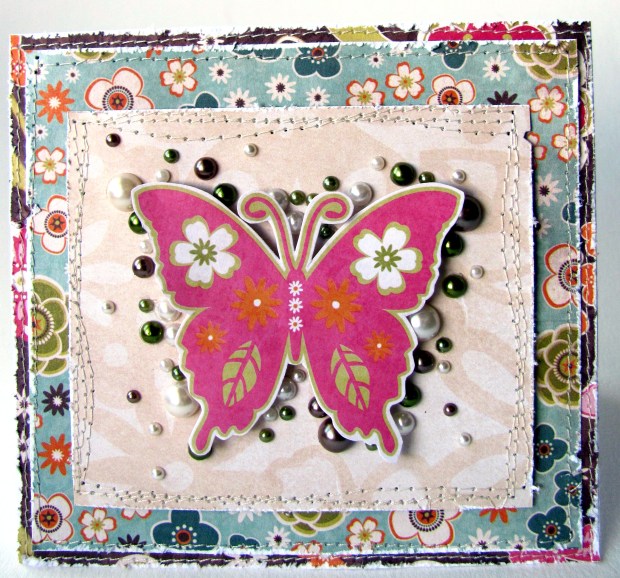
 To create this card Nancy used paper from Samantha Walker Blossom Collection for Creative Imaginations, as well as a print and cut butterfly digital die from my designs in the Silhouette store. I love those textured beads on this layout...and that stitching is a fantastic touch!
 Don't you love these CUTE cards!  I do!  Nancy showcased some Samantha Walker dies from the Silhouette store...the cherries on the left and my birdcage design on the right.  I love that she has a butterfly in the cage ready to fly out at any moment...perfect for a congratulatory card.
 This layout has such a fun grouping on the right.  Love all the texture of buttons and flowers.  Nancy used paper and stickers from Samantha Walker Blossom collection for Creative Imaginations.
Another wonderful card by Nancy! Paper and stickers from Samantha Walker Blossom Collection for Creative Imaginations.

 My favorite thing about this layout...the unexpected use of hot orange-y red to add a little excitement to the color scheme.  Nancy used fabric from Samantha Walker Enchanted Garden collection for Riley Blake Designs.
 Another two sweet cards...Nancy used paper and stickers from the Samantha Walker Heidi collection for Creative Imaginations.

 Who doesn't just love the retro look of pink and hot orange with a touch of brown...such of fun color combo!  Nancy used several birdhouse digital dies from the Silhouette store, she also used Creative Imaginations Foundations cardstock, and fabric from the Samantha Walker Enchanted Garden Collection for Riley Blake.
Sonic can make any kids day a happy YUMMY day...check out that grin!  Nancy used paper and stickers from the Samantha Walker Heidi and Blossom collections for Creative Imaginations.

Thanks for popping in on Nancy's Creative Team spotlight. I hope you enjoyed getting to know her better as I have. I hope you will frequent her blog often.

Thursday, February 24, 2011

Creative Team Spotlight: Guiseppa Gubler

I get to highlight Guiseppa this month!  Guiseppa is freaky talented with her innovative ideas and creativity and is certainly a joy to have as part of my creative team. She is a paper crafter at heart, but also loves to dabble with fabric and other dimensional crafts. I interviewed Guiseppa and this is what she said:

Q.  What is your favorite Technique?
A.  Well...if you can call it a technique I guess it would be using pop dots.  I love adding dimension to my projects.  I go through so many pop dots...I should have taken stock in them.  If you look closely at some of the projects I have done here, you will see the dimension.

Guiseppa used Creative Imaginations "Real Wood" (a wood laminated paper product) as her  base for this layout. Love how the wood works with her daughter's hair and the grass in the background. Her title and various shapes are Samantha Walker die cuts for the Silhouette machine.
Q.  Where did you learn to design?
A.  Well, it wasn't something I learned in school..LOL!  I stared scrapbooking 16 years ago and I haven't stopped.  I guess I am self taught.  I just got better and better at the craft year after year.  I taught myself by just trying new techniques and styles.  I guess if you spend most of your days scrapbooking then you get pretty good at designing...at least I hope!  Hehe!

For this layout Guiseppa created the birdcage with Samantha Walker digital dies as well as other designer dies for Silhouette.  I love that Guiseppa created a page about herself...so often, that is who we scrapbook about the least, and it is wonderful when crafters take a moment to document their own personalities and life happenings.

Q.  What influence your design choices?
A.  Well, I love looking at the new trends and I am always wanting to try them out.  I think I just take the trends and make them my own.  I get a lot of scrappy inspiration from online and scrapbooking magazines.

The cowboy hat is a Samantha Walker digital die for Silhouette. Love the various textures on this layout!


Q.  Who are your artsy inspirations?
A.  I love Danielle Flanders, Christine Middlecamp and Leena Loh...just to name a few.  I do have to say the the lovely Samantha Walker has become a real inspiration to me! (I'm blushing, Guiseppa, that is sweet of you to say so...I promise that I didn't ask this question to fish for that answer.)  She always coming up with fun, new and exciting products for us girls to get our craft on with.  I was just going through some of my Silhouette files, and yes, most of them are Samantha Walker's designs.  Being on this design team has really helped me to broaden my crafty horizon and try new things that I have never done before and I credit that to Samantha Walker.
The hearts and scallops are Samantha Walker digital dies for Silhouette. 
Love the dangly button and bow idea...see, she's clever!
Q.  What do you enjoy doing besides crafting?
A.  I love the outdoors!  You can often find our family up in the mountains with our trailer, fishing poles and 4 wheeler, ready for the outdoorsy experience.  We spent much of our summer camping, hiking, fishing and 4 wheeling.  I also enjoy exercising.  Since I have lost over 50 pounds exercising has become part of my life.  I recently have taken up Zumba.  This is a real fun way to get my dance on...which I really miss, one of my other loves in life!  Yes, I do love to dance and you can often find me in my scrapbook room listening to music and when a fun beat comes on I don't hesitate to dance!

The "little birdie" title is a Samantha Walker die for the Silhouette machine. She also used Lori Whitlock digital dies also for the Silhouette machine. 

 The fleur de lis is a Samantha Walker digital die for the Silhouette machine. Check out Guiseppa's paper roses with bead details...so pretty!

I hope you enjoyed getting to know Guiseppa better.

Related Posts Plugin for WordPress, Blogger...